
Pak Vip Game Login
Registration and login on PAK VIP take about two minutes when they work, and cause real frustration when they do not. This guide covers both, including the invitation-code field, the OTP that fails to arrive on Pakistani networks, and the domain check that matters more here than on an ordinary website.
Searching for “pak vip login” on its own returns the NADRA PAK-VISA portal, which is a government visa service and nothing to do with this app. If you are looking for the game, keep the word game in your search. It is a small thing that saves people landing on the wrong site and entering credentials there.
What you need before registering
There is no document upload and no identity verification at signup, which makes the process quick but also means your phone number is effectively your identity on the platform. Have these ready.
- NumberA Pakistani mobile number that can receive SMS. If your phone has two SIMs, put this one in slot one — dual-SIM routing is a common cause of OTP failures.
- PasswordA password you do not use anywhere else, and specifically not the one protecting your email or mobile wallet.
- WalletA JazzCash or Easypaisa account registered in your own name. This matters at withdrawal, not registration, but fixing it later is far harder than getting it right now.
- CodeAn invitation code, if you have one. It is optional, but it usually cannot be added after the account exists.
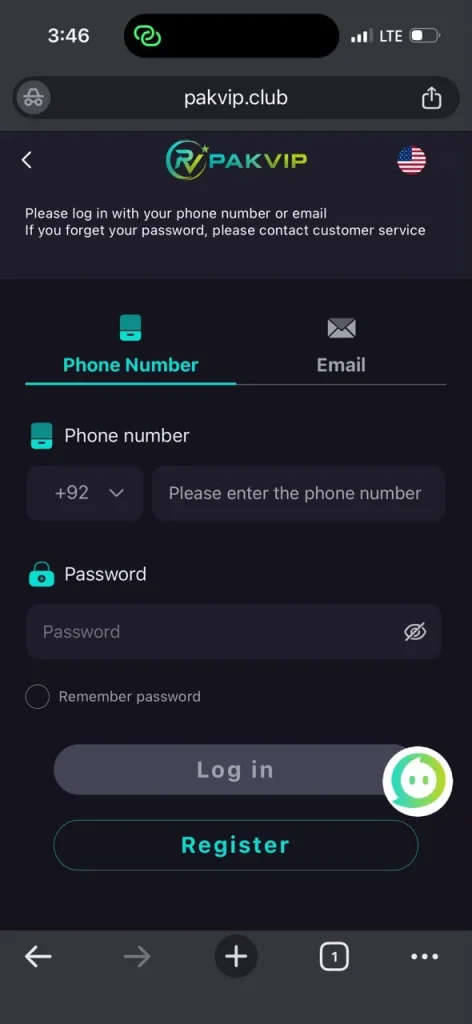
The PAK VIP game login and registration screen
Both actions run from the same screen. The number field is pre-set to the +92 country code, and there is an email tab alongside the phone tab, though phone is the route that matters in Pakistan because it is the one tied to the OTP.
How to register on PAK VIP, step by step
Open the app or the official site
If you have not installed it yet, follow the download guide first. Registering through the web version and then signing in on the app works fine — it is the same account.
Choose Register rather than Login
Both buttons sit at the top of the home screen. Registration opens the phone-number form.
Enter your mobile number
Use the local format the field expects. Country-code prefixes are a frequent cause of a rejected number.
Set your password
Make it unique to this account. If the platform is ever compromised, a reused password puts your email and wallet at risk too, and that is a much bigger problem than losing a game balance.
Enter the invitation code if you have one
The field is usually labelled invitation or referral code and is often collapsed behind a small “optional” toggle, which is why people miss it. It links your account to whoever referred you and may unlock a signup bonus. It generally cannot be applied retroactively — see the bonus and agent guide for what it actually changes.
Confirm the SMS code
An OTP arrives by SMS. Enter it to activate the account. If it does not arrive, the next section is the one you need.
Secure the account before funding it
Turn on two-step verification in the account menu before you deposit anything, rather than after.
The OTP never arrived — how to actually fix it
Every competing guide explains “forgot password” and stops. In practice the failure that blocks most Pakistani users at registration is a missing OTP, and it has specific, fixable causes. Work through these in order.
Wait properly before resending
SMS delivery through aggregators can lag by a couple of minutes at busy times. Repeatedly tapping resend often triggers a rate limit that delays things further. Wait, then resend once.
Check the SIM slot
On dual-SIM phones, verify the registered number is the SIM actually receiving SMS and that it has signal. This alone resolves a large share of cases.
Check message filtering
Android's spam or promotional filtering frequently diverts messages from short codes into a separate tab. Look in the filtered or spam folder of your messaging app before concluding nothing arrived.
Check any Do Not Disturb block list
If you have previously registered a Do-Not-Call or promotional block on your number with your operator, category-blocked SMS can be suppressed. This one is invisible from the phone and worth ruling out with your operator.
Free up the message inbox
A genuinely full SMS store silently drops incoming messages on some devices. Deleting old threads restores delivery.
Try a different network path
Switching between mobile data and Wi-Fi changes how the request reaches the platform. It is a common workaround when the send request itself is failing rather than the SMS.
If none of these work, the number may already be attached to an existing account. Try the password-reset flow on that number before creating a second account, because duplicate accounts on the same number are a routine reason for later withdrawal refusals.
Completing the PAK VIP game login day to day
Once registered, signing in is your number plus your password, with an OTP or two-step code when the platform does not recognise the device. Staying signed in on your own phone is reasonable; staying signed in on a shared or borrowed one is not, given the wallet balance attached to the account.
Forgot your password
Use the reset link on the login screen. Recovery runs through the same SMS channel as registration, so if the OTP is the problem, the section above applies here too. Set a new unique password rather than a variation of the old one.
Common login errors and what they mean
- InvalidInvalid credentials. Usually a number-format mismatch rather than a wrong password. Try the format you registered with, without the country code.
- LockedAccount temporarily locked. Triggered by repeated failed attempts. Waiting is the fix; more attempts extend the lock.
- DeviceNew device verification. Expected when you sign in from a different phone. It should ask once, not repeatedly.
- SessionSession expired. Normal after a long idle period, and also occurs when the same account signs in elsewhere — if you did not do that, change your password immediately.
- NetworkCannot connect. Frequently a blocked domain rather than a broken app. See the next section.
The domain problem, and why your login “stops working”
This is the real-world failure that guides in this niche never explain, and it is specific to this category of platform. Real-money gaming sites are subject to blocking by the Pakistan Telecommunication Authority, so operators rotate domains. One week the site loads; the next it does not, and the app reports a connection error that looks like a fault on your side.
When an official domain stops resolving, people search for a working one — and that search is exactly what phishing clones are built to capture. A cloned login page collects your number, password and OTP, and the first sign of trouble is a balance that disappears shortly after you sign in. The account was never “hacked” in any sophisticated sense; the credentials were typed into the wrong site.
- CheckVerify a new domain through an official channel you already trusted before the outage, such as the operator's established Telegram channel, rather than through a fresh search result or an advert.
- TypeType the address yourself instead of following links from forwarded messages, which are the primary distribution route for clone domains.
- NeverNever enter your wallet PIN on any page that asks for it alongside your game login. No legitimate deposit flow needs it.
- ReactIf you suspect you used a clone, change the password on the real site immediately and change any other account sharing that password.
Assume domain changes will happen. It is a structural feature of operating in this market, not an occasional glitch, and it is one of the reasons we treat the trust question as the most important page on this site.
Devices, sessions and being logged in twice
No competing guide documents this, and it matters because the symptoms are easy to misread as a fault.
Platforms in this category generally allow one active session per account. Signing in on a second phone typically ends the session on the first, which you experience as being unexpectedly logged out mid-session. If you use both a phone and the web version, expect this and do not interpret every logout as a security incident.
The distinction is simple. If you signed in somewhere else, an unexpected logout is normal. If you did not, a session ending by itself means someone else authenticated as you — and the usual explanation is credentials entered into a phishing clone during a domain outage, not a technical fault. Change your password immediately from a session you started by typing the address yourself, change it anywhere else you reused it, and check your wallet history for transfers you did not make.
- SharedNever stay signed in on a borrowed or shared phone. The account holds a wallet balance.
- PublicAvoid signing in over public Wi-Fi where you cannot verify the network.
- SecondDo not create a second account to work around a login problem. Duplicate accounts on one number, device or wallet are a standard terms breach and a routine reason for later withdrawal refusal — contact support instead.
- LeavingSign out explicitly rather than just closing the app if the device is not solely yours.
Securing the account properly
- 2FAEnable two-step verification in the account menu before your first deposit, not after your first win.
- PasswordUnique to this platform. Never the password on your email or mobile wallet.
- OTPNever share a code with anyone, including someone claiming to be support. Genuine support never needs your OTP.
- NameKeep your registered name matched to your wallet name. Mismatches are the most common reason withdrawals are refused later — see the withdrawal guide.
- DevicesSign out on any borrowed phone, and treat an unexpected session-expiry as a possible sign someone else signed in.
Account ready
With registration done, the next decisions are funding and bonuses. Read how deposits settle and which bonus conditions apply before you transfer money.
Frequently asked questions
How do I log in to PAK VIP game?
Open the app or the official site, choose Login, and enter the mobile number you registered with plus your password. If you are signing in from a new phone the platform will send a verification code by SMS. Keep the word game in any search you run, because searching for pak vip login alone returns the unrelated NADRA PAK-VISA portal.
Why am I not receiving the PAK VIP OTP?
The usual causes are a dual-SIM phone where the registered number is not in the receiving slot, the message being diverted into your messaging app's spam or promotional folder, a full SMS inbox silently dropping messages, or an operator-level promotional block on your number. Wait a couple of minutes before resending, since rapid resends can trigger a rate limit that delays delivery further.
Can I add an invitation code after registering?
Generally not. The invitation or referral field is presented during signup, often collapsed behind an optional toggle, and most platforms in this category will not attach a referrer to an account after it has been created. If a signup bonus matters to you, enter the code before completing registration.
What do I do if I forget my PAK VIP password?
Use the reset option on the login screen, which sends a recovery code to your registered number. Because recovery runs over the same SMS channel as registration, any OTP delivery problem affects it too. Set a new password that is unique to this platform rather than a variation of the old one.
The app says it cannot connect. Is my account gone?
Usually not. Platforms in this category are subject to PTA blocking and rotate domains in response, so a connection error is often the domain rather than your account. Confirm any replacement address through a channel you already trusted before the outage, and be very careful with search results and forwarded links, because clone login pages exist specifically to harvest credentials during these outages.