
Pak Vip Game Download
The PAK VIP game download is an Android APK installed directly from the operator rather than through the Play Store. This guide covers the requirements, the installation steps, the security warning Android will show you, how to satisfy yourself that you have the genuine build, and what the realistic options are on iPhone and desktop.
PAK VIP app details at a glance
These are the specifications the operator publishes for the app. We reproduce them for convenience and label them accordingly: they are sourced, not independently verified, and apps in this category push updates frequently, so treat the version and size as approximate.
| Detail | Published value | Status |
|---|---|---|
| App name | PAK VIP | Observed |
| Download size | 22 MB | Operator figure |
| Version | v1.0 | Operator figure |
| Platform | Android (APK) | Observed |
| Region | Pakistan | Observed |
| Payment methods | Easypaisa, JazzCash, bank transfer | Advertised |
| Price | Free | Observed |
| Minimum deposit | Rs 300 | Operator figure |
| Minimum withdrawal | Rs 500 | Operator figure |
| Publisher licence | None published | Not found |
The last row matters more than the rest. Several guides to this app describe it as “licensed” without naming a regulator or a licence number. We looked for a verifiable licence and did not find one, so that is what we report. An absent licence is not proof of dishonesty, but it does mean there is no regulator you can escalate a dispute to.
What PAK VIP Game is, and who it suits
PAK VIP is a real-money gaming app built for the Pakistani market. It bundles colour prediction rounds, slot titles from third-party studios, live dealer tables, lottery draws, crash games and card games into one wallet, and it settles deposits and withdrawals through the mobile wallets most people in Pakistan already use.
The audience it is designed for is fairly specific: someone on an Android phone, comfortable with JazzCash or Easypaisa, who wants short sessions rather than long ones, and who is willing to stake real money on outcomes decided by chance. If any part of that description does not fit you, this is not the right app, and no amount of bonus marketing changes that.
There is a second audience the platform courts openly, which is people who want to recruit other players. The agent programme pays a percentage of team activity, and it is promoted at least as heavily as the games themselves. We cover how that actually works, and what it is realistically worth, on the bonus and agent commission page.
What it is not
It is not a job, a side income, or a savings product, and it should not be treated as one. Every game in the lobby is built with a house edge, meaning the mathematics favour the platform over enough rounds. People do win individual sessions — that is what makes the format compelling — but the expected long-run result for a player is a loss. Any guide that tells you otherwise is selling something.
Every game type inside PAK VIP
The lobby splits into categories along the top of the home screen. Knowing which is which before you install saves a lot of aimless tapping.
Colour prediction
The signature format for apps in this category. A round runs on a short timer, you back a colour or a number, and the result settles immediately into your wallet balance. Rounds are quick, which makes it easy to play far more of them than you intended — the main practical risk with this format is not any single bet but the speed at which they accumulate.
Slots
The largest section by title count. The lobby displays studio branding for JILI, CQ9, JDB, Microgaming and others, meaning the games themselves are licensed in from established suppliers rather than built by the platform. Each title has its own paytable and volatility.
Live dealer tables
Streamed table games under an Evolution branding block. These need a stable connection; on a weak mobile signal the stream degrades before the betting interface does, which can leave you placing bets you cannot properly see.
Lottery
Scheduled draws with fixed prize tiers. Slower than the other formats and correspondingly less prone to rapid loss, though the odds structure is still set in the platform's favour.
Crash and original games
A multiplier climbs and you choose when to cash out; if the round ends first, the stake is lost. Simple to grasp and unusually easy to chase losses on, because the interface makes an immediate re-entry a single tap away.
Card and fishing games
Teen Patti-style card tables and arcade-style fishing shooters, where you spend ammunition to hit targets with different payout values. The fishing format converts a betting decision into something that feels like a skill game, which is worth being conscious of.
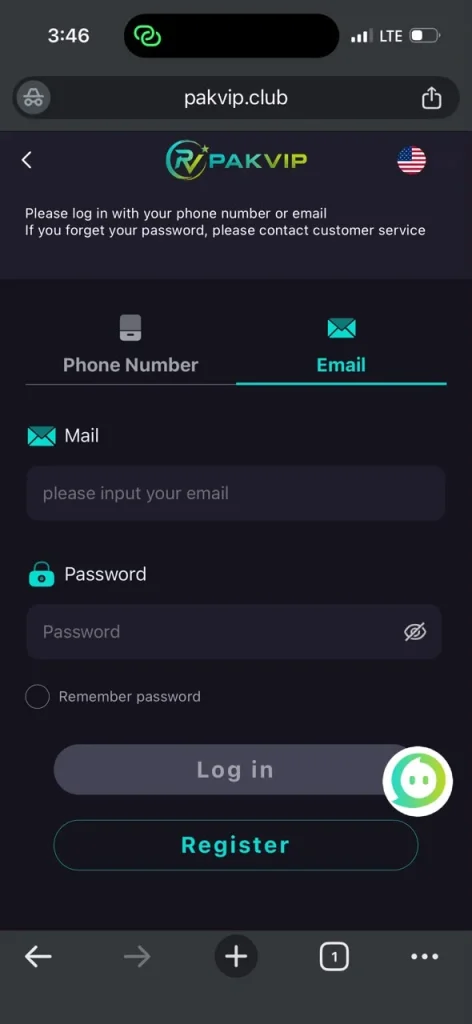
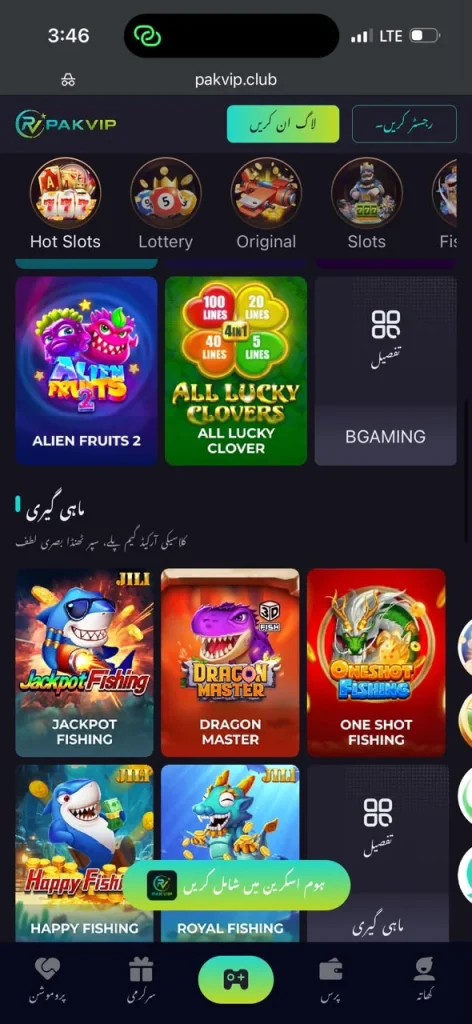
What the lobby looks like once installed
The screenshot below shows the game catalogue as it appears after installation, with studio-branded titles grouped by category. It is worth looking at before you install, because it shows what the product actually is: a casino aggregator wrapped in an earning-app presentation.
Before you download: Android requirements and permissions
The app is undemanding on hardware. In practice, any Android phone from the last several years running Android 6.0 or newer will run it, and the download itself is small enough to complete on a mobile connection.
- OSAndroid 6.0 or newer. There is no meaningful benefit to a newer version beyond general security patching.
- StorageThe download is around 22 MB, but plan for noticeably more once installed — see the section on install size below.
- RAM2 GB is workable for the prediction and lottery games. Live dealer streams are the heaviest part of the app.
- NetworkA stable connection matters most for live tables. Prediction rounds tolerate a weaker signal.
- SIMA Pakistani number that can receive SMS, because registration uses an OTP. Put it in slot one if your phone has two SIMs.
The permission question nobody answers
Guides to this app routinely list features and skip permissions entirely. That is the wrong way round: on a direct APK install, the permission list is one of the few genuine signals you have, because you are bypassing the Play Store review that would normally flag an over-reaching app.
We are not going to publish a permission list we have not verified on a current build, because the list changes between versions and a stale list is worse than none. Instead, here is how to check it yourself in under a minute, which is a more durable skill than any list we could give you.
Inspect before you grant
During installation Android shows the permissions the app requests. Read that screen rather than tapping through it. Take a screenshot if it scrolls.
Audit after installing
Open Settings, then Apps, find PAK VIP, and open Permissions. This lists everything granted and everything requested, and lets you revoke individually.
Judge against what the app does
Storage and notifications are consistent with a gaming app. SMS access is worth pausing on, since OTP codes arrive by SMS and an app that can read them can read others too. Contacts access is worth questioning hard for a game that has no social feature beyond a referral code you type manually.
Revoke what you do not need
Most permissions can be denied without breaking gameplay. If revoking one does break the app, that itself tells you something about how the app is built.
How to complete the PAK VIP game download and install it
The install is a standard sideload. The only step that surprises people is the security prompt, which is covered properly in the next section rather than waved away here.
Open the official source on your phone
Start the download from the operator's own site in your mobile browser. Do not install a PAK VIP APK forwarded to you over WhatsApp or Telegram, or downloaded from a general APK-mirror site — repackaged builds of gaming apps are a real and well-documented problem, and a mirror has no incentive to serve you the clean file.
Allow installs from your browser
Android will block the install the first time. Follow the prompt to Settings and enable installation from your browser specifically. Grant it to that one app rather than switching on a blanket setting, and turn it back off once you are done.
Let the download finish completely
A partially downloaded APK fails with a generic parsing error that people commonly misread as the file being fake. Check the file size in your Downloads folder before opening it.
Open the file and read the permission screen
Tap the downloaded APK. Read the permissions rather than tapping straight through, as covered above.
Handle the Play Protect prompt
Android will warn you about an app from an unknown developer. What that warning does and does not mean is explained below — read it before deciding.
Open the app and register
Launch it and create your account. The registration and login guide walks through the invitation-code field and the OTP step, including what to do when the code does not arrive.
What the Play Protect warning actually means
Every other guide to this app tells you to ignore this warning. That is bad advice presented as helpfulness, because it teaches you to dismiss the one security check standing between you and a repackaged build. It is more useful to understand what the warning is actually saying.
Play Protect scans the APK against Google's catalogue of known-malicious signatures and flags apps installed from outside the Play Store because they have not been through Play's review. The warning is not a verdict that this specific file is malware. It is a statement that the file is unreviewed and unattributed — Google does not know who built it. Google documents the behaviour itself in its Play Protect help pages.
It does not verify that the file came from PAK VIP rather than from someone who modified it. It does not detect a repackaged build that adds credential-harvesting code and is otherwise identical. It does not tell you whether the operator behind the app will pay you. Passing this warning is a very low bar, and clearing it proves almost nothing about the things you actually care about.
The practical conclusion: the warning is expected on any direct APK install and is not itself a red flag, but “just ignore it” is the wrong lesson. The right lesson is that because Android cannot vouch for the file, the burden of verifying the source falls entirely on you.
How to check you have the official build, not a repack
This is the gap in every competing guide, and it is the one that actually protects your money. A repackaged APK looks and behaves like the real app while adding code that captures your login and OTP. The standard defence is comparing the file's cryptographic hash, or the signing certificate, against a value the developer publishes.
We looked for a published SHA-256 hash or signing fingerprint for the PAK VIP APK and could not find one. Without a published reference value there is nothing to compare your download against, which means the strongest available verification method is simply unavailable for this app. That is a genuine weakness, and we would rather tell you than pretend the check is possible.
Given that, here is what you can still do, in descending order of usefulness:
- SourceDownload only from the operator's own domain, typed into the address bar yourself rather than reached through a forwarded link. This is now your primary defence rather than a supplementary one.
- CompareInstall once, then note the signing certificate using any APK-inspection tool. On future updates, confirm the certificate matches. A changed signing key on an “update” is a serious warning sign.
- SizeA build that is dramatically larger than the published size may have extra code bundled in. Not conclusive, but worth noticing.
- BehaviourA genuine build asks for the OTP once during registration. An app that repeatedly requests your OTP or asks for your wallet PIN is not behaving normally — uninstall it and change your credentials.
- NeverNever enter your JazzCash or Easypaisa account PIN into the gaming app. It has no legitimate reason to ask. Deposits are authorised in the wallet app, not the game.
Download size versus real install size
The published figure of 22 MB is the download, not the footprint. Apps of this type ship a small installer and then pull game assets on first launch, so the space actually consumed is materially higher once you have opened a few categories — slot titles and live-table assets in particular are fetched on demand and cached.
Plan for the app to grow well beyond its download size over the first few sessions. If you are close to full storage, clearing the cache in Settings, then Apps, then Storage will reclaim the downloaded assets, at the cost of re-fetching them next time. We are giving you the mechanism rather than a specific figure because the number depends entirely on which game categories you open.
iOS and PC: the honest position
Competing guides handle this badly. Several claim iOS support and then document only the Android process, and the reference site for this brand does exactly that. Here is the accurate picture.
iPhone and iPad
There is no App Store listing, for the same reason there is no Play Store listing: Apple does not distribute real-money gaming apps of this type into this market. What exists in practice is a web version added to the home screen through Safari's Share menu using “Add to Home Screen”. That produces an icon that opens the site in a full-screen browser view. It is a shortcut, not a native app, and it will behave slightly differently — notifications and background behaviour in particular are limited.
Be sceptical of any site offering you a PAK VIP .ipa file or asking you to install a configuration profile to get an iOS build. Installing an enterprise profile hands significant control of your device to whoever issued it, and that is a far larger risk than anything on the Android side.
Windows and desktop
There is no desktop client. You can open the web version in a desktop browser, and you can run the Android build inside an emulator, though an emulator adds its own security surface and some platforms restrict emulator play in their terms. For most people the phone is simply the intended device.
Updating and removing the app
Because the app is outside the Play Store, it will not update itself through Google. Updates are delivered either as an in-app prompt or as a fresh APK from the operator's site, which means you should apply the same source discipline to every update as you did to the first install. An “update” delivered by message from another player is exactly the vector a repack would use.
Removing it is ordinary: long-press the icon and uninstall, or use Settings, then Apps. Uninstalling deletes the local app and cache but does not close your account or remove your data from the operator's servers — for that you need to contact support directly, and our privacy policy explains what that involves and its limits.
When the install fails: the four common errors
Sideloading produces a small set of recurring failures, and all four are misdiagnosed constantly in this niche — usually as evidence that the file is fake, when the real cause is mundane.
- Parse“There was a problem parsing the package.” Nearly always an incomplete or corrupted download rather than a bad file. Check the size in your Downloads folder against the published figure, delete it and download again on a stable connection. It can also appear if the APK targets a newer Android version than your phone runs.
- Blocked“For your security, your phone is not allowed to install unknown apps.” The install permission has not been granted to the app you downloaded with. Follow the prompt through to Settings and enable it for that browser specifically, then return and tap the file again.
- Conflict“App not installed” with no further detail. Usually a signing conflict with an existing copy: an older or differently signed build is already on the device. Uninstall the old one first. Note that this also means you will lose any locally cached data, though your account lives on the server.
- SpaceInstall stalls or fails near completion. Insufficient free storage, remembering that the installed footprint exceeds the download size. Clear space and retry.
If the app installs but immediately asks for permissions unrelated to a game — particularly SMS access it did not request during installation, or your mobile wallet PIN — stop and uninstall it. That is not a normal failure mode, and it is consistent with a repackaged build. Then change any password you entered.
What happens on first launch
Knowing the expected sequence makes an abnormal one easier to spot. On first open the app fetches game assets for the categories you visit, which is why the initial load is slower than later ones and why the storage footprint grows. You will then be asked to register or log in — the registration guide covers that step and the OTP that follows.
What should not happen: a request for your JazzCash or Easypaisa PIN, a demand for an OTP before you have entered a phone number, or a prompt to install a second application. None of those belong in a normal first launch, and any of them is a reason to remove the app rather than to proceed carefully.
Pros and cons of the PAK VIP download
In its favour
- Small download that completes quickly on a mobile connection.
- Runs on modest, older Android hardware.
- Payment rails are the ones most Pakistani users already have.
- Game supply comes from established third-party studios rather than being built in-house.
- Registration is short and needs no document upload.
Against it
- No published hash or signing fingerprint, so the official build cannot be verified properly.
- No verifiable licence, and therefore no regulator to escalate a dispute to.
- Outside the Play Store, so no automatic security review and no automatic updates.
- iOS is a browser shortcut rather than a real app, however it is marketed.
- Platforms in this category are subject to PTA blocking and domain changes.
On balance, the installation itself is straightforward and the technical requirements are trivial. The meaningful risks are not about the download at all — they are about who is behind the platform and whether it pays. That is a different question, and it deserves its own page: is PAK VIP real or fake.
Next step: create your account
Once the app is installed, registration takes about two minutes. The guide covers the invitation-code field and the OTP failure that catches most first-time users.
Frequently asked questions
Why is PAK VIP not on the Google Play Store?
Google does not distribute real-money gaming apps of this type into the Pakistani market, so the operator offers a direct APK instead. The consequence is that the app receives no Play Store review and no automatic updates, and Android will show a Play Protect warning during installation.
Is it safe to install the PAK VIP APK?
The installation mechanism itself is standard Android sideloading and is not inherently dangerous. The risk is the source: because no official file hash or signing fingerprint is published, you cannot cryptographically confirm your download matches the developer's build, so downloading only from the operator's own domain becomes your main protection. Never install a copy forwarded through a messaging app.
Why does my phone say the app is harmful?
That is the standard Play Protect notice for any app installed from outside the Play Store. It means the file has not been reviewed by Google, not that this specific file has been identified as malware. It is expected here, but it also means Android cannot vouch for the file, so verifying where you downloaded it from matters more than usual.
Can I download PAK VIP on an iPhone?
There is no App Store listing and no genuine iOS app. What is available is the web version saved to your home screen through Safari's Add to Home Screen option, which opens the site full screen. Avoid any site offering an .ipa file or asking you to install a configuration profile, as that grants substantial control over your device.
How big is the PAK VIP app?
The operator publishes a download size of about 22 MB. The installed footprint is larger, because game assets for slots and live tables are downloaded on demand and cached after first launch. Clearing the app cache reclaims that space at the cost of re-downloading assets later.
What should I do if the APK will not install?
The most common cause is an incomplete download, which produces a parsing error people often mistake for a fake file — check the file size in Downloads and re-download if it looks short. The second most common cause is that installation from your browser has not been permitted yet; Android prompts for this the first time and you can grant it to that browser specifically.